Test Mode
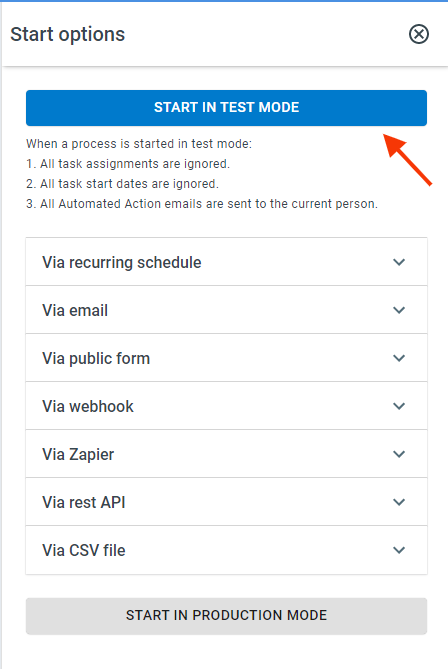
ProcessPlan has a Test Mode that allows you to walk through your Processes before running them live within your organization. When in Test Mode, all process tasks are assigned to the Process Initiator, all task start dates are ignored, and all Automated Action emails are sent to the Process Initiator.
To start a process in Test mode:
-
Log in to your account
-
Click Administration > Processes > Template Diagrams
-
Click the card of the Process you want to test
-
Click the Start Process (Play) button in the template designer menu > Start In Test Mode
Running a Soft Launch for a Process
Section titled “Running a Soft Launch for a Process”One effective method for testing processes is limiting the visibility of new processes to certain groups and allowing those groups to execute the processes and provide feedback. This method is called a Soft Launch.
To limit the visibility and access on a process, do the following:
-
Log in to your account
-
Click the card of the process you want to work with
-
Click the Settings Panel (gear icon)
-
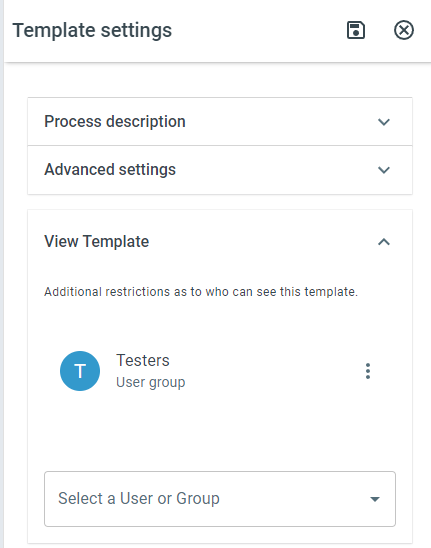
Under View Template, select the user or group to grant visibility to
-
Click Save at the top of the panel