
=!EQUALS (Does Not Equal)
The !EQUALS function is the opposite of =EQUALS. It returns true when the values you give it are not all the same. Most often you give it two values: a process field and a value it should not hold.
Syntax
Section titled “Syntax”=!EQUALS(Value1;Value2;Value3;...)Parameters
Section titled “Parameters”- Value1, Value2, Value3, …
The values to compare, such as a field token and a fixed value.
Each value must be separated by a semicolon (;).
How It Works
Section titled “How It Works”-
Compares every value with every other value, the same way =EQUALS does.
-
If even one value is different from the others, the function evaluates to true.
-
If all of the values are equal, the function evaluates to false.
Usage Notes
Section titled “Usage Notes”-
With three or more values, the result is true unless every value is the same.
=!EQUALS([[Field: Status (Text)]];Approved;Pending)is true even when the Status field holds Approved, because Approved and Pending are different from each other. -
To check that a field matches none of several values, wrap the =ANYTRUE check from the =EQUALS page in =NOT:
=NOT(=ANYTRUE(=EQUALS([[Field: Status (Text)]];Approved);=EQUALS([[Field: Status (Text)]];Pending))) -
A field token’s value is compared as one value, even when it contains a semicolon. If text you type into the formula yourself contains a semicolon, such as JSON, wrap it in =ENCLOSE so it is compared as one value too.
-
Semicolons (;) must be used to separate values.
Example
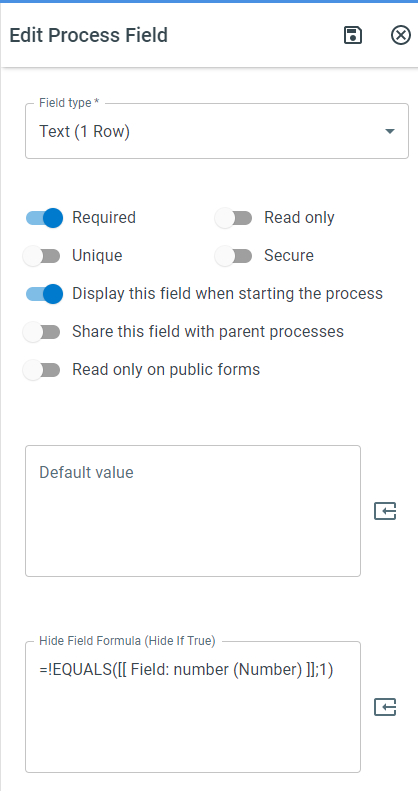
Section titled “Example”=!EQUALS([[Field: number (Number)]];1)- Evaluates to true when the field value is anything other than 1.
Keywords
Section titled “Keywords”!EQUALS, does not equal, not equal function, formula function, conditional logic, field comparison, process field validation, workflow formulas, boolean function