
Field Tokens
Field Tokens give you the ability to insert process data and dynamic values. Field tokens can be used in various places in ProcessPlan.
To insert a field token, do the following:
-
Click the Import Field Tokens icon next to the text box
-
Search for and select a token
-
Click Insert Field Token
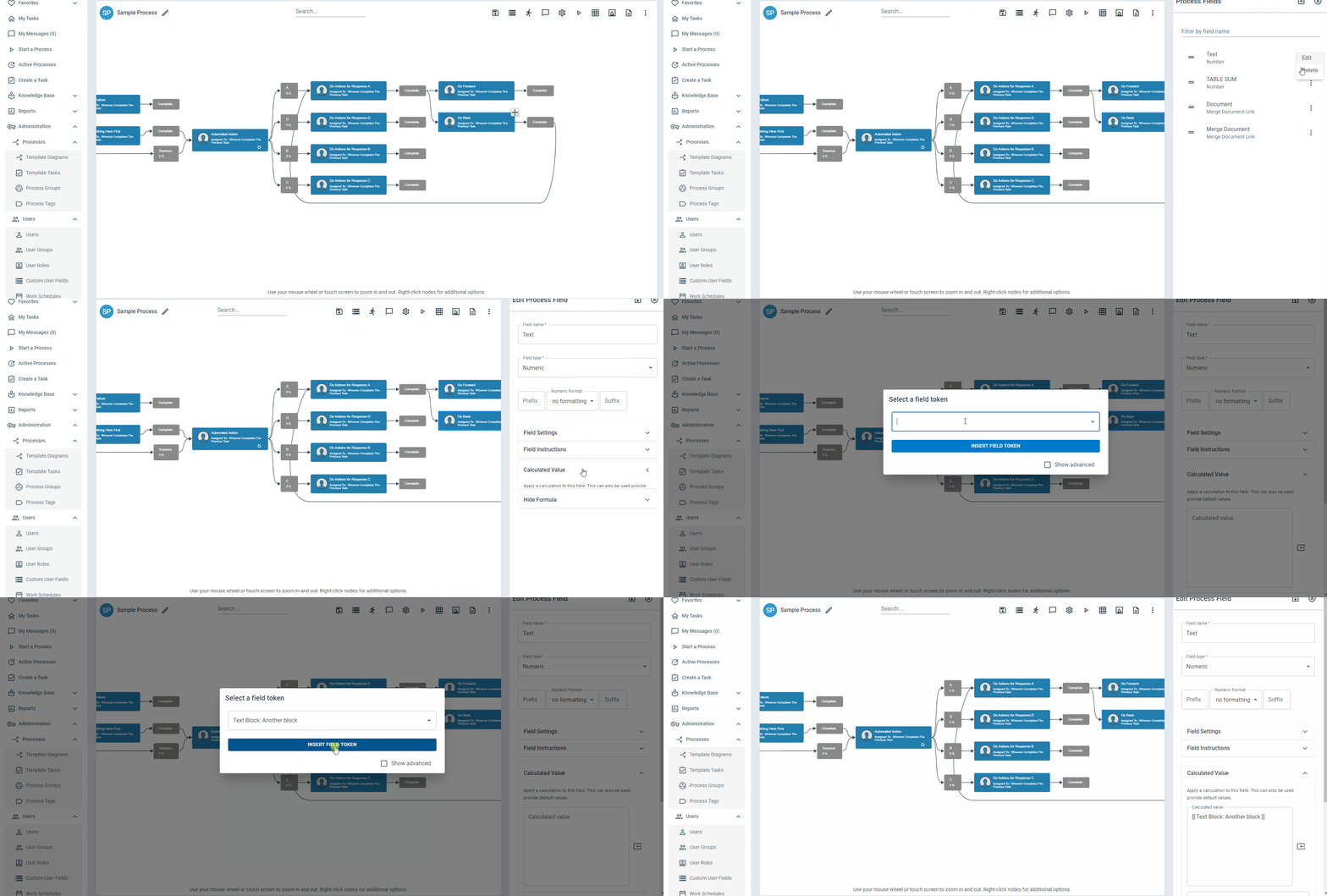
In a text box, the token goes where your cursor is, including the very start. If you haven’t clicked or typed in the box yet, the token is added to the end. In a rich text editor, the token goes where the editor’s cursor is, so click where you want it first.
A box that holds a list of email addresses, users or phone numbers always gets the token at the end of the list as a new entry, so it can’t run into an address that is already there. This applies to automated action and AI Employee action settings, and to a merge document’s email To, CC and BCC boxes.
Below is a list of field tokens available:
Account Value: Example - This token inserts a specified Account Value
Document: Example (URL)* - This token inserts a URL for a specified Merge Document
Document: Example (Link) - This token inserts a hyperlink for a specified Merge Document
Public Form: Example (URL)* - This token inserts a URL for a specified Public Form
Public Form: Example (Link) - This token inserts a hyperlink for a specified Public Form
Public Table: Example (URL)* - This token inserts a URL for a specified Public Table
Public Table: Example (Link) - This token inserts a hyperlink for a specified Public Table
Applies to All Fields
Field: Example (Text) - This token inserts the text in a process field
Field: Example (Value)* - This token inserts the value in the field without any formatting
Applies to URL Fields
Field: Example (Link) - This token inserts a hyperlink pointing to the value in the specified URL field
Field: Example (URL)* - This token inserts the URL in the specified URL field
Applies to Date Fields
Date fields include: Process Start Dates, Current Dates, Task Start/Due Dates, Task Assignment Dates, Task Completion Dates, Task Creation Dates, Process Template Creation/Modification Dates
Field: Example (Date) - This token inserts the specified date
Field: Example (Date/Time) - This token inserts the specified date and the current time
Field: Example (Long Date) - This token inserts the written version of the specified date. e.g., January 1st, 2022
Field: Example (Age in Days) - This token inserts the process age in days from the specified date to the current date
Field: Example (Age in Minutes) - This token inserts the process age in minutes from the specified date to the current date
Field: Example (ISO)* - This token inserts the ISO formatted version of the specified date
Applies to Email Fields
Field: Example (Email) - This token inserts a value that validates as an email address
Applies to Numeric Fields
Field: Example (Number) - This token inserts a value that validates as a number
Applies to Checklist Fields
Field: Example (Vertical) - This token inserts the items that have been selected in a specified checklist in a vertical format
Applies to Attachment Fields
Field: Example (File Name Only) - This token inserts the file name in the specified attachment field
Field: Example (Private Link) - This token inserts a hyperlink to the file(s) in the attachment field. Users will need to log in upon clicking the link
Field: Example (Private URL)* - This token inserts a URL to the file(s) in the attachment field. Users will need to log in upon clicking the URL
Field: Example (Public Link) - This token inserts a hyperlink to the file(s) in the attachment field.
Field: Example (Public URL)* - This token inserts a URL to the file(s) in the attachment field.
Field: Example (Attachment) - This token inserts the actual attachment. It works in the Email and AI Prompt actions, which can genuinely send a file along. The token is offered wherever attachment field tokens are listed, but anywhere else it resolves to nothing. To copy an attachment from one process field into another, use the field’s (Value) token with the Field: Replace Value action instead.
Applies to Conversation Fields
Field: Example (Newest Entry) - This token inserts the text of the newest message in a Conversation field. If that message has only files, it inserts their file names
Field: Example (Newest Entry Author) - This token inserts the label on the newest message, such as the name of the person who wrote it
Field: Example (Newest Entry Author Kind) - This token inserts how the newest message arrived: person for your team, public_user for a public form or link, email for an email reply, or automation
Field: Example (Whole Conversation) - This token inserts every message, oldest first, each with its time in UTC, its author, and the names of its files
Field: Example (Newest Entry ID)* - This token inserts a number that changes with every new message
Applies to User Fields
User fields include: Users selected in a process field, Process initiator, assigned user, current user, template creator, template modifier, Parent template creator, Parent template modifier, all supervisors
Field: Example (First Name) - This token inserts the first name of the specified user
Field: Example (Last Name) - This token inserts the last name of the specified user
Field: Example (Full Name) - This token inserts the full name of the specified user
Field: Example (Email) - This token inserts the email address of the specified user
Field: Example (Title/Position) - This token inserts the Title/Position of the specified user
Field: Example (Mobile) - This token inserts the mobile number of the specified user
Field: Example (Company Name) - This token inserts the company name on the profile of the specified user
Field: Example (Minutes Today Instance Table) - This token inserts a table displaying the tasks completed and minutes the specified user spent today
Field: Example (Minutes Today Total) - This token inserts the minutes the specified user has spent today
Field: Example (Hours Today Instance Table) - This token inserts a table displaying the tasks completed and hours the specified user spent today
Field: Example (Hours Today Total) - This token inserts the hours the specified user has spent today
Field: Example (Minutes This Week Instance Table) - This token inserts a table displaying the tasks completed and minutes the specified user spent this week
Field: Example (Minutes This Week Total) - This token inserts the minutes the specified user has spent this week
Field: Example (Hours This Week Instance Table) - This token inserts a table displaying the tasks completed and hours the specified user spent this week
Field: Example (Hours This Week Total) - This token inserts the hours the specified user has spent this week
Field: Example (Custom Field) - This token inserts the specified user’s custom field
Applies to Process Table Builder Fields
Field: Example (Table) - This token inserts the data in a table builder field in a Table format
Applies to Process Table Lookup Fields
A Process Table Lookup field pulls fields through from the process it looks up, so the token list also offers each of those fields, named after the lookup field they come through: Field: Customer: Contact Name (Text).
Where the lookup field can match more than one record - Lookup (Multiple), a checklist, or a query - each of those pulled-through fields is offered a second time as a (Row Repeater):
Field: Example: Example (Row Repeater) - This token repeats a table row, once for every record the lookup matched
Use it in formatted content that contains a table, such as an Email action’s body. Build one row of the table the way you want every record to look, insert Row Repeater tokens into it, and that whole row is repeated once per matched record when the email goes out. Fields that are not repeaters print once, as usual.
If a lookup field matches only one record at a time, there is nothing to repeat, so no Row Repeater tokens are offered for it.
Applies to Current Process and Parent Process
Field Table (All Fields) - This token inserts a table with all process fields and their values
Field Table (w/Values Only) - This token inserts a table of all the fields with values
All Process Participants (Names) - This token inserts a list of all users who have tasks assigned in the process
All Process Participants (Emails) - This token inserts a list of email addresses for users who have tasks assigned in the process
Process Name - This token inserts the name of the current process
Process Template Description - This token inserts the description of the current process
Process Field Name List (Table) - This token inserts a table with the name of each process field in the current process
Process Field Name List (Comma) - This token inserts a comma separated list of the names of the process fields in the current process
Process Instance ID* - This token inserts the ID of the current process instance
Process Private (URL)* - This token inserts the URL to the process diagram
Process Private (Link) - This token inserts a hyperlink to the process diagram
Process Public (URL)* - This token inserts a link that opens a Milestone report for the current instance
Process Public (Link) - This token inserts a hyperlink that opens a Milestone report for the current instance
Process Full Text Log - This token inserts a text log that contains all task responses, process field values, and process notes
Process All Task Notes - This token inserts a log of all the task notes in the process instance
Process Instance Count - This token inserts the number of instances that have been launched for the current process
Process Instance Description - This token inserts the description for the specified process instance. What that description says is set by the Instance Description Formula
Process Field 1 (Name) - This token inserts the name of the 1st process field in the process
Process Field 1 (Text) - This token inserts the value in the 1st process field in the process
Process Field 1 (Value)* - This token inserts the unformatted value in the 1st process field in the process
Process (Minutes Today User Table) - This token inserts a table displaying the minutes each user has spent on the current process today
Process (Minutes Today Total) - This token inserts the number of minutes spent working on this process today
Process (Hours Today User Table) - This token inserts a table displaying the hours each user has spent on the current process today
Process (Hours Today Total) - This token inserts the number of hours spent working on the current process today
Process (Minutes This Week User Table) - This token inserts a table displaying the number of minutes spent this week by each user
Process (Minutes This Week Total) - This token inserts the number of minutes spent this week
Process (Hours This Week User Table) - This token inserts a table displaying the number of hours spent this week by each user
Process (Hours This Week Total) - This token inserts the number of hours spent this week on the current process
Process (Minutes Total) - This token inserts the total amount of minutes spent working in this process
Process (Hours Total) - This token inserts the total amount of hours spent working in this process
Public Milestone (URL)* - This token inserts a link that opens a Milestone report for the current instance
Public Milestone (Link) - This token inserts a hyperlink that opens a Milestone report for the current instance
Public Progress Report (URL)* - This token inserts a URL that leads to a public progress view
Public Progress Report (Link) - This token inserts a hyperlink that leads to a public progress view
Task Description - This token inserts the task description for the current task.
Task Instructions - This token inserts task instructions for the specified task.
Task ID* - This token inserts the task ID for the current task.
Task Submitted Response - This token inserts the selected response for the specified task. If no task is specified, the response for the current task will be used
Task (Private URL)* - This token inserts a URL for a task. Login will be required to see the task
Task (Public Link) - This token inserts a hyperlink to a task
Task (Public URL)* - This token inserts a link to a task
Task (Public Response Links) - This token inserts response links for a task. Response links allow you to respond to a task via email
Task (Public Response URLs)* - This token inserts response URLs for a task. Response links allow you to respond to a task via email
Task Assigned To - This token will insert the name of the Task Assignee for a task
Task Notes - This token inserts task notes for a specified task
Task Checklist (Selected/Comma Separated) - This token inserts a comma separated list of selected checklist items on a task
Task Checklist (Selected/New Line Separated) - This token inserts a new line separated list of selected checklist items on a task
Task Checklist (All/New Line Separated) - This token inserts a new line separated list of all the items in a checklist
Task List (Step Guide) - This token inserts a list of tasks in a step by step guide
Task List (New Line) - This token inserts a list of tasks separated by a new line
Task Milestone List (New Line) - This token inserts a list of the process milestones separated by a new line
Account Name - This token inserts the name of the ProcessPlan account
User Group: Example (Name List) - This token inserts the name of each member in a specified user group
User Group: Example (Email List) - This token inserts a list of email addresses for members of a specified user group
User Group: Example (Least Utilized User Name) - This token inserts the name of the least utilized user in a specified user group
User Group: Example (Least Utilized User ID)* - This token inserts the ID for the least utilized user in a specified user group
Work Schedule: Example (ID)* - This token inserts the ID for the specified work schedule
Current Field Text - This token inserts the current text in a process field that triggers an action. On a JavaScript Code Source field it inserts the text the user has typed into the drop down so far - see Populating Drop Down Options with JavaScript