
Work Schedules
Work schedules allow you to enter the days your company will be working in ProcessPlan so actions and scheduled processes won’t be launched on days you are not working.
To set your work schedule, do the following:
-
Click Administration > Users > Work Schedules
-
Click New Work Schedule in the top right > Give your Work Schedule a Name
-
Paste the dates from your work schedule into the Work Schedule field > Click Save
You need the Edit User Accounts permission in your user group to create or change work schedules.
ProcessPlan offers a downloadable spreadsheet template for building a work schedule. The Template is structured as follows:
-
In the Valid Date column, enter a valid date
-
The day of the week will be automatically calculated
-
Enter the work Start Time in the Work Start Time column
-
In the Work Duration column, enter the length of the workday in minutes. If there is no work on a particular day, enter 0 as the duration or leave the duration blank
-
Copy the values in the ISO Date for ProcessPlan column and Paste them into the Work Schedule section in ProcessPlan. Click Save
Using your Work Schedule
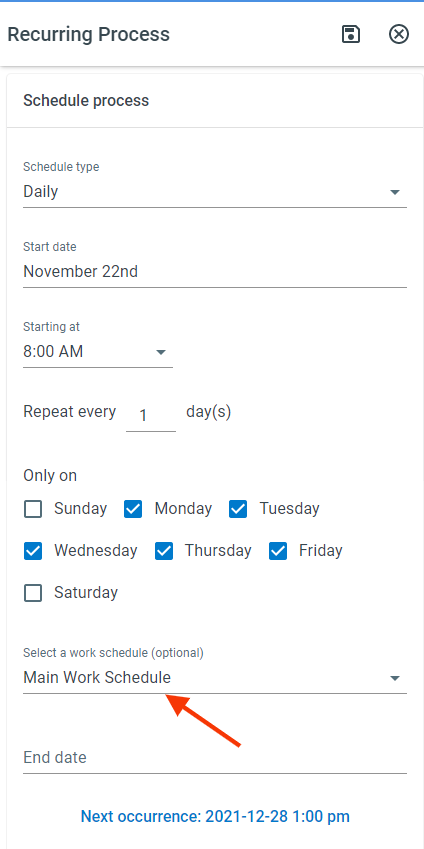
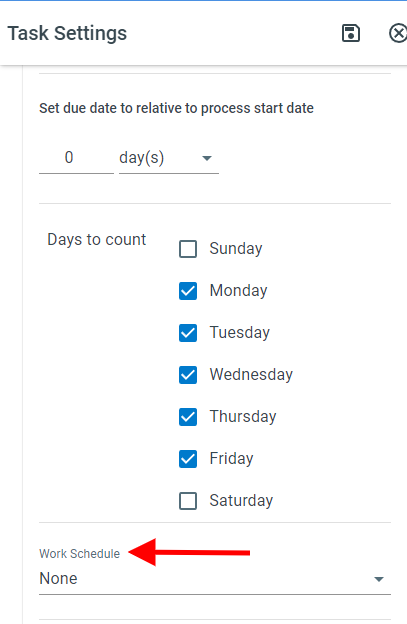
Section titled “Using your Work Schedule”Work Schedules can be used in scheduled processes, automated actions, and tasks.
Deleting a Work Schedule
Section titled “Deleting a Work Schedule”-
Click Administration > Users > Work Schedules
-
Check the box next to each work schedule you want to delete > Click the Delete All Selected icon > Click Delete
You need both the Edit User Accounts and Bulk Imports / Bulk Edits permissions in your user group to delete work schedules.
You can’t delete a work schedule while a task, scheduled process, automated action, or AI report schedule still uses it. ProcessPlan tells you how many of each still use it. Choose another work schedule for them first, then delete it.