
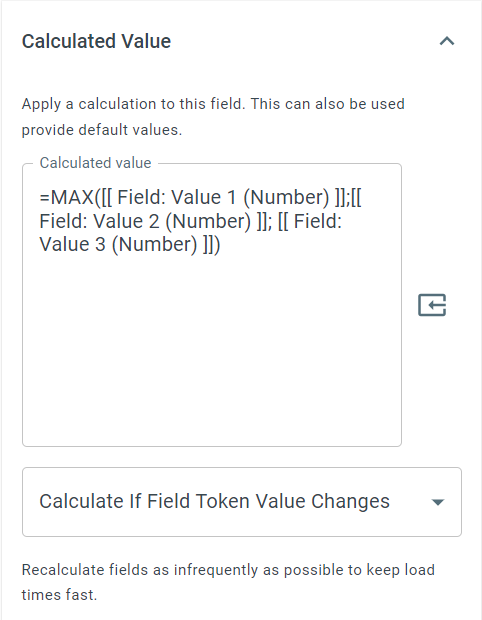
=MAX
The MAX function returns the largest value from a list separated by semicolons. It works with two kinds of value: give it numbers and it returns the highest one, give it dates and it returns the latest one.
Syntax
Section titled “Syntax”=MAX(Parameter1; Parameter2; Parameter3; ...)Parameters
Section titled “Parameters”- Parameter1, Parameter2, Parameter3, … – The values or field tokens to evaluate. Every value must be a number, or every value must be a date. Do not mix the two kinds in one function.
How It Works
Section titled “How It Works”-
Reads the whole list first and decides whether it is a list of numbers or a list of dates.
-
Skips values that are empty, so a field token that has no value yet is ignored rather than counted as zero.
-
With numbers, returns the highest number found.
-
With dates, returns the latest date found, written as
YYYY-MM-DDTHH:MM:SS(for example2026-07-30T00:00:00).
Usage Notes
Section titled “Usage Notes”-
Formula functions are case sensitive and must be written in ALL CAPS.
-
All parameters must be the same kind of value. If the list mixes numbers with dates, or contains text that is neither, the function cannot be evaluated and the formula stays on the field exactly as you wrote it.
-
Field tokens can be used instead of hard-coded values, including Date and Date/Time field tokens.
-
Useful for finding maximums such as highest cost, largest quantity, latest deadline, or the most recent date a customer was contacted.
-
You can include as many parameters as needed - there is no fixed limit as long as syntax is valid.
-
To show the date result in a friendlier format, wrap it in =FORMATDATE, for example
=FORMATDATE(dd MMM yyyy; =MAX([[Field: Start (Date)]]; [[Field: Review (Date)]])).
Example - Numbers
Section titled “Example - Numbers”=MAX(15; 6; 27; 10)Returns: 27
Example - Dates
Section titled “Example - Dates”=MAX(2026-03-04; 2025-11-18; 2026-07-30)Returns: 2026-07-30T00:00:00
Keywords
Section titled “Keywords”MAX, maximum value, latest date, most recent date, numeric comparison, date comparison, list of numbers, list of dates, workflow formulas, Boolean logic, formula function