
=APPEND
The APPEND function combines values by adding one or more items to an existing field value.
Syntax
Section titled “Syntax”=APPEND(Separator; Item)Parameters
Section titled “Parameters”-
Separator
-
The character or characters placed in front of the appended item (for example: space, comma, dash).
-
Spaces count. They are kept exactly as you type them, so
=APPEND( - ; ...)gives you “Acme - 10482” while=APPEND(-; ...)gives you “Acme-10482”.
-
-
Item
-
The value or process field to append.
-
Use the Insert Field Token button to insert process data.
-
How It Works
Section titled “How It Works”-
Appends the specified item to the text that comes before the function.
-
Inserts the separator between the existing value and the appended item.
-
If the item is empty, nothing is added at all, not even the separator. That is what keeps a line from ending in a stray dash or comma when a field has not been filled in yet.
-
Can be used repeatedly or nested to append multiple values.
Usage Notes
Section titled “Usage Notes”-
Put the value you are appending to in front of the function, as in
[[ Field: Customer (Text) ]]=APPEND( - ; [[ Field: Invoice Number (Text) ]]). -
Ensure the separator and the item are both inside the parentheses, divided by a semicolon.
-
Always close square brackets and parentheses correctly.
-
Use the Insert Field Token button to reference process fields.
-
Formulas saved before August 2026 use an older form,
=APPEND({Separator}, Item). They keep working exactly as they always have, so there is nothing to rewrite. Write new formulas with the semicolon shown above. -
A common use is the Instance Description Formula, which chains APPEND to label each running process with its own field values.
Example
Section titled “Example”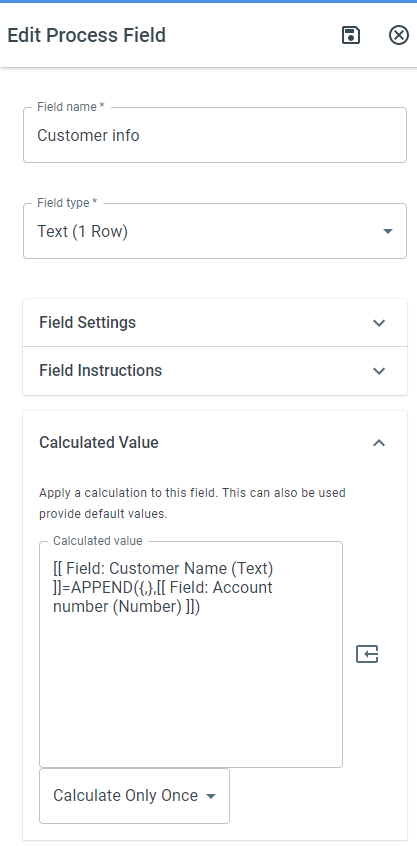
Keywords
Section titled “Keywords”APPEND, append function, concatenate values, combine fields, string concatenation, separator, formula function, field tokens, workflow formulas, process calculations