
=ANYTRUE
The ANYTRUE function evaluates multiple expressions or functions and returns 1 (true) if any parameter evaluates to true. If all parameters evaluate to false, the function returns 0 (false).
Numeric results are also supported: any number greater than 0 is evaluated as true.
Syntax
Section titled “Syntax”=ANYTRUE(IsThisFunctionTrue;IsThisFunctionTrue;etc...)Parameters
Section titled “Parameters”- IsThisFunctionTrue
A function or expression to evaluate.
Multiple parameters may be included and must be separated by semicolons (;).
How It Works
Section titled “How It Works”-
Each parameter inside the function is evaluated.
-
If any parameter returns true or a numeric value greater than 0, the function returns 1.
-
If all parameters return false or 0, the function returns 0.
Usage Notes
Section titled “Usage Notes”-
All parameters must be enclosed within the same set of parentheses.
-
Semicolons (;) are required to separate each parameter.
-
Any valid function or expression can be used as a parameter.
Example
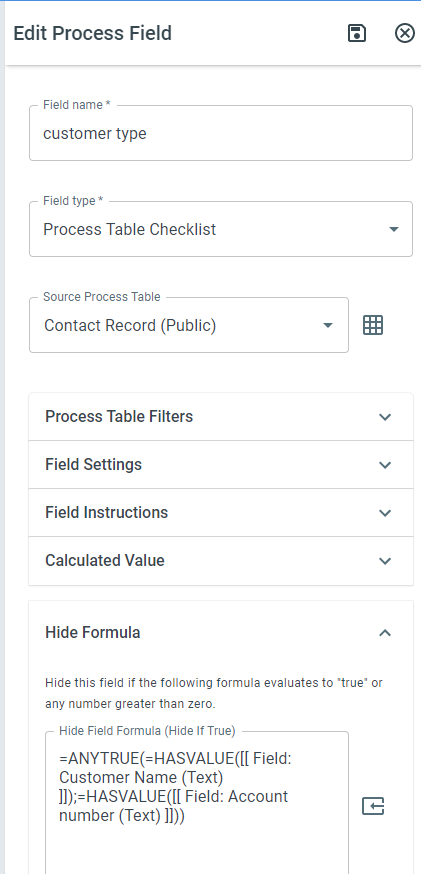
Section titled “Example”In this example, if either HASVALUE function returns true, the entire ANYTRUE function returns 1 (true).
Keywords
Section titled “Keywords”ANYTRUE, logical OR, boolean function, formula function, conditional logic, evaluate multiple expressions, workflow formulas, true false evaluation