
=DATEADD
The DATEADD Function allows you to perform arithmetic on dates held in Process Fields.
Syntax
Section titled “Syntax”=DATEADD(UnitToIncrement; IncrementBy; DateToIncrement; Optional IncrementUntilMinimumDate)Parameters
Section titled “Parameters”-
UnitToIncrement
- The unit of time to add or subtract: minute, hour, workhour, day, weekday, week, month, year.
-
IncrementBy
- The numeric value to add (positive) or subtract (negative) from the date.
-
DateToIncrement
- The date field or value you want to adjust.
-
IncrementUntilMinimumDate (optional)
- If provided, the function will increment the date repeatedly until it reaches the specified minimum date.
How It Works
Section titled “How It Works”-
Adds or subtracts the specified time unit from the given date.
-
Optional minimum date ensures the date does not go below a certain value when incrementing.
-
Supports positive and negative increments.
Usage Notes
Section titled “Usage Notes”-
Use semicolons (;) to separate each parameter.
-
Field tokens can be used to reference process dates.
-
Formula functions are case sensitive and must be in all caps.
-
Always close parentheses after entering all parameters.
Example
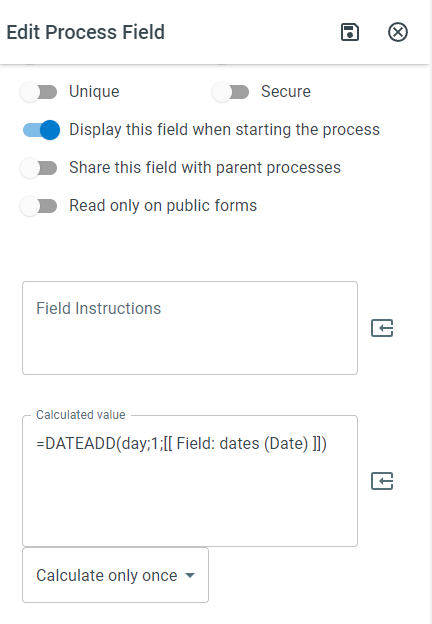
Section titled “Example”=DATEADD(day; 1; [[Field: dates (Date)]])- Adds 1 day to the date in the “dates” process field.
Keywords
Section titled “Keywords”DATEADD, date arithmetic, add to date, subtract from date, date calculation, process field dates, workflow formulas, time increment, formula function