
Prefilling Field Values in a Public Form Using the URL
Public Forms allow you to securely collect information from people who are outside of your ProcessPlan account. Public Forms can be used to start new process instances or to collect information from people in the middle of an existing process that is already running.
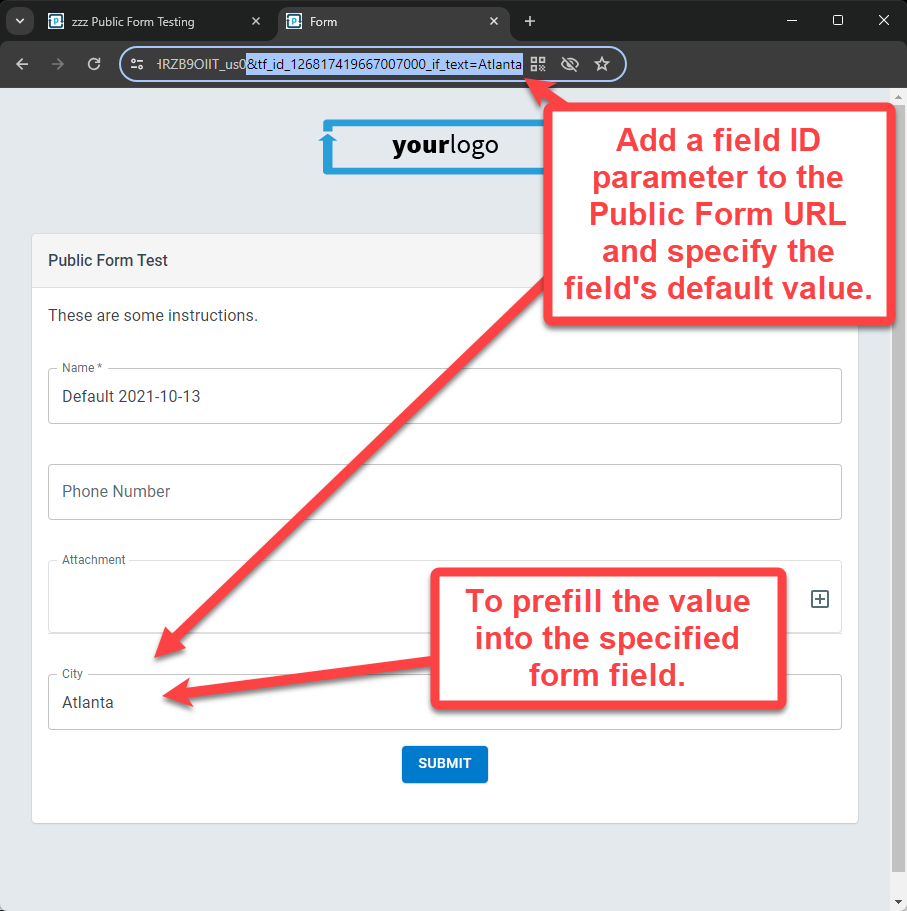
In this article, we’ll show you one of several methods to prefill information in your Public Form fields by passing the field values via the Public Form’s URL. Below is an example of how this works.
The easiest way to find the field’s ID value is to perform a search on the corresponding field’s column in the Process Table.
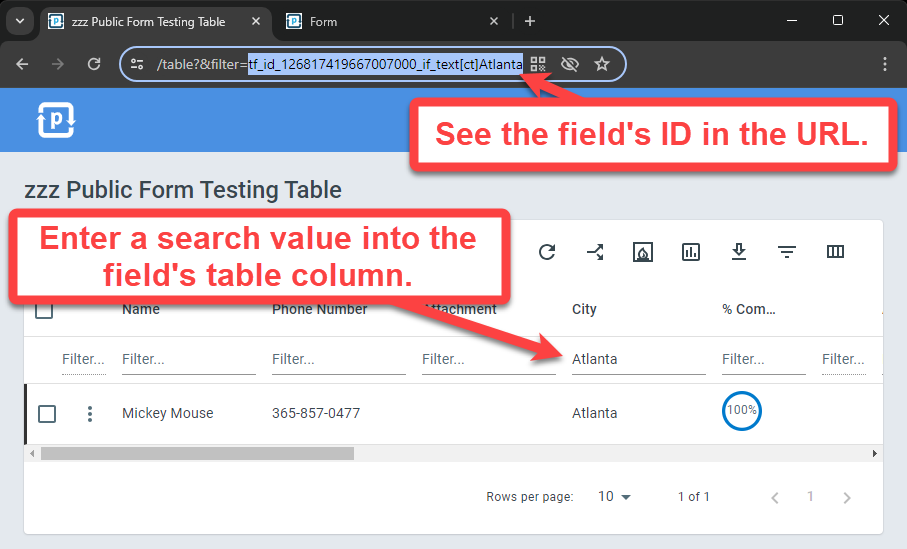
Notice that when applying a table column filter, the value is displayed in the URL as:
tf_id_123456789012345678_if_text[ct]AtlantaTo adjust the column filter URL parameter to prefill a Public Form field, simply replace the “[ct]” with an equal sign ([ct] is a search operator that stands for “contains”). See the updated URL parameter below.
tf_id_123456789012345678_if_text=AtlantaSo the resulting Public Form URL would look like this. Keep in mind that each URL parameter must be separated by an ampersand (&) and you can specify as many Public Form default field values as you need with this method. Only fields the form shows are saved when it is submitted, so a field you want prefilled has to be on the form.
https://ui.processplan.com/public/process/form/123456789012345678?tkn_id=XXXXXXXX&tf_id_123456789012345678_if_text=Atlanta&tf_id_1234567890123456_if_text=AnotherFieldValueEncoding field values
Section titled “Encoding field values”A few characters have a special meaning inside a URL, so they need to be written in their encoded form to reach the field intact.
Write spaces as %20. So Atlanta%20Georgia prefills the field with “Atlanta Georgia”. Do not use a plus sign in place of a space: Atlanta+Georgia prefills the literal text “Atlanta+Georgia”.
A plus sign is passed through exactly as you type it. Phone numbers and email addresses that contain a plus need no special handling, so %2B15551234567 and +15551234567 both prefill “+15551234567”.
Encode these characters when they appear inside a value, because otherwise they end the value or start a new parameter:
| Character | Write it as |
|---|---|
| space | %20 |
& | %26 |
= | %3D |
? | %3F |
# | %23 |
% | %25 |
Here is a link that prefills a multi-word city and a phone number:
https://ui.processplan.com/public/process/form/123456789012345678?tkn_id=XXXXXXXX&tf_id_123456789012345678_if_text=Atlanta%20Georgia&tf_id_1234567890123456_if_text=+15551234567