=TABLELOOKUP
The TABLELOOKUP Function pulls in a value from any Process Table.
Syntax
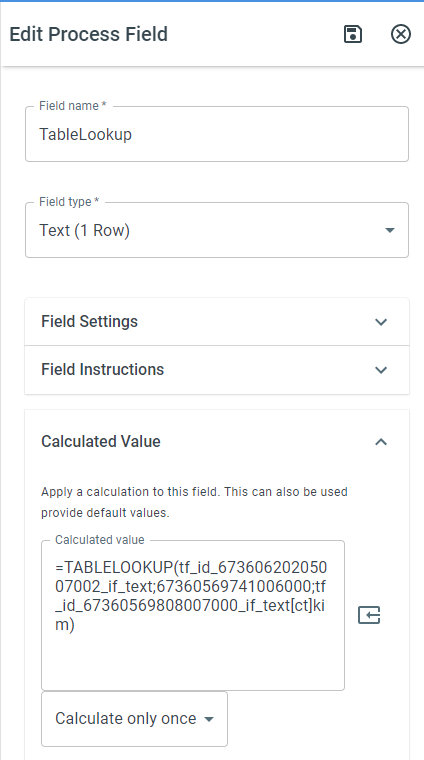
Section titled “Syntax”=TABLELOOKUP(FieldTokenToRetrieve; TableID; TableQuery)-
FieldTokenToRetrieve**:** Any Field Token you want to retrieve from the table.
-
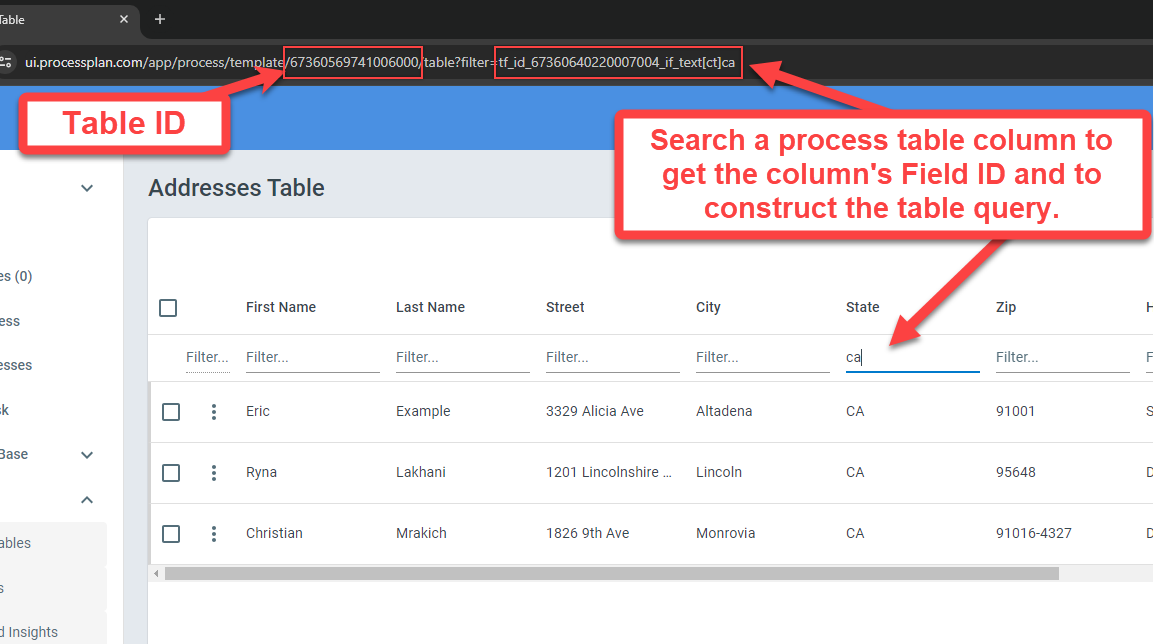
TableID: The ID of the process table you’ll be pulling from
-
TableQuery: The search query you want to apply to the function. The table query can be found by accessing the process table, entering your search query in the filter fields and copying everything after the “filter=” parameter
To use the TABLELOOKUP Function, do the following:
-
In the parenthesis following =TABLELOOKUP, enter the parameters for your search. Don’t forget to close your parenthesis.
-
Click Save
Example
Section titled “Example”=TABLELOOKUP(tf_id_67360630307007003_if_text; 67360569741006000; tf_id_67360630307007003_if_text[ct]RENO&take=1)Return a value from the specified process table.
Reno, NV
Below is a screen shot that describes how to find and retrieve each of the parameters for this function.