
=IF
The IF function evaluates one or more conditions and returns a specified value when a condition is true. If none of the conditions are true, it can return a default false value (optional). Useful for conditional logic, validation, and branching workflows.
Syntax
Section titled “Syntax”=IF(ConditionCheck; IfTrueReturnThis; AnotherConditionCheck; IfTrueReturnThis; OptionalIfFalseReturnThis)Parameters
Section titled “Parameters”-
ConditionCheck – The first condition to evaluate (can use comparison or formula functions).
-
IfTrueReturnThis – The value to return if the corresponding condition is true.
-
AnotherConditionCheck; IfTrueReturnThis; … – Additional conditions and their return values (optional).
-
OptionalIfFalseReturnThis – Value to return if none of the conditions are true (optional).
How It Works
Section titled “How It Works”-
Evaluates each condition in order.
-
Returns the value corresponding to the first true condition.
-
If no conditions are true, returns the optional false value (if provided) or blank.
Usage Notes
Section titled “Usage Notes”-
Conditions can use other formula functions like EQUALS, GTNUM, etc.
-
A condition is true when it is 1, true, t, or any number greater than 0. Anything else, including 0, text, or a blank, is false.
-
Semicolons (;) separate conditions and return values.
-
Formula functions are case sensitive and must be written in ALL CAPS.
Example
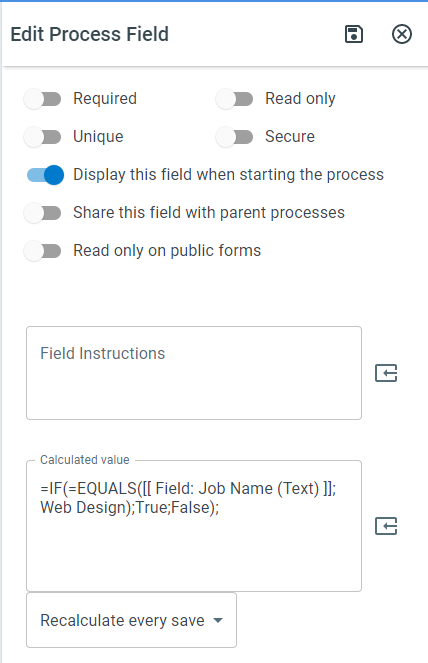
Section titled “Example”=IF(=EQUALS([[Field: Job Name (Text)]]; Web Design); True; False)- Returns True if the Job Name field equals “Web Design”; otherwise, returns False.
Keywords
Section titled “Keywords”IF, conditional logic, if statement, workflow formulas, true/false evaluation, process field conditions, formula function, branching logic