
Welcome to ProcessPlan
ProcessPlan helps your team design business processes once, then run them consistently every time. Instead of checklists scattered across email and spreadsheets, every process becomes a repeatable template with clear tasks, owners, and progress you can see at a glance.
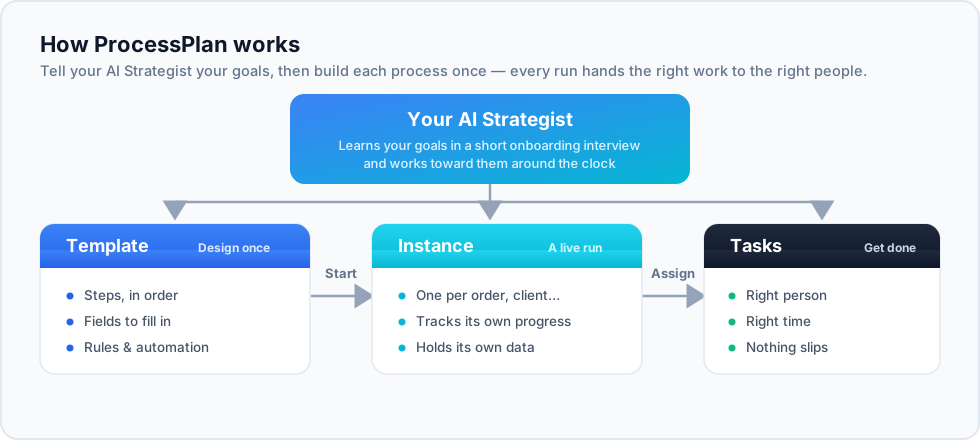
Core concepts
Section titled “Core concepts”- AI Strategist - your always-on strategic partner, built into ProcessPlan. It learns your goals in a short onboarding interview, then studies your business, watches your processes and data, and works toward those goals around the clock.
- Process template - the reusable definition of a process: its steps, who does them, and in what order. You build a template once and refine it over time.
- Process (instance) - a single run of a template. Launching a template creates a live process with real tasks assigned to real people.
- Task - one unit of work inside a running process. Tasks are assigned, completed, and tracked, moving the process forward.
- Process diagram - a visual flow chart of a template or a running process, so you can see structure and progress instead of reading lists.
Your AI Strategist
Section titled “Your AI Strategist”The AI Strategist is central to ProcessPlan. In a short onboarding interview it records your company’s goals as strategic initiatives; from then on it briefs you each morning with an AI Daily Briefing, continuously surfaces insights from your processes and data, and is always one click away in the AI Strategy Session - a conversation that knows your business, shared across every page of the app.
New to it? Start with Getting Started with the AI Strategist, or read the full story on our website.
Signing in
Section titled “Signing in”ProcessPlan runs in your browser at ui.processplan.com. Sign in with your work account; if your organization is new to ProcessPlan, the person who created the account can invite you from the user administration area.
ProcessPlan is also available as a mobile app for iOS and Android - see Mobile Apps.
Where to go next
Section titled “Where to go next”- Navigating the App - a quick tour of the main areas.
- Getting Started with the AI Strategist - meet your strategic partner.
- Process Templates - build your first template.
- Running Processes - launch it and track the work.