
=EQUALS
The EQUALS function checks whether all of the values you give it are the same. Most often you give it two values: a process field and the value you expect it to hold. Commonly used for validation, conditional logic, and workflow decisions. The EQUALS function is formatted as follows:
Syntax
Section titled “Syntax”=EQUALS(Value1; Value2; Value3; ...)Parameters
Section titled “Parameters”-
Value1, Value2, Value3, …
-
The values to compare, such as a field token and a fixed value.
-
Each value must be separated by a semicolon (;).
-
How It Works
Section titled “How It Works”-
Compares every value with every other value.
-
If all of the values are equal, the function returns 1 (true).
-
If even one value is different from the others, the function returns 0 (false).
-
Uppercase and lowercase letters count as the same, so
Approved,approvedandAPPROVEDare all equal. Spaces at the start or end of a value are ignored too. -
Values are compared as text, not as numbers, so
1and1.0are different.
Usage Notes
Section titled “Usage Notes”-
With three or more values, every one of them must match.
=EQUALS([[Field: Status (Text)]]; Approved; Pending)always returns 0, because Approved and Pending can never equal each other. -
To check whether a field matches any one of several values, give each value its own EQUALS and wrap them in =ANYTRUE. See the last example below.
-
Semicolons (;) are required to separate values.
-
Formula function names are case sensitive and must be written in ALL CAPS.
Examples
Section titled “Examples”=EQUALS([[Field: number (Number)]]; 1)- Returns 1 (true) if the field value is 1.
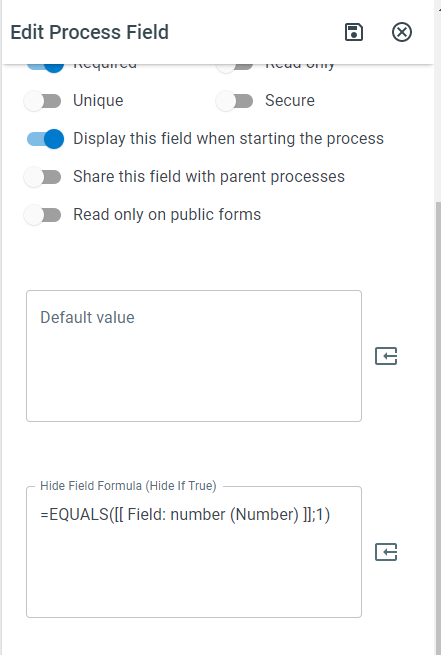
=EQUALS([[Field: Status (Text)]]; [[Field: Prior Status (Text)]]; Approved)- Returns 1 (true) only if both fields hold Approved.
=ANYTRUE(=EQUALS([[Field: Status (Text)]]; Approved); =EQUALS([[Field: Status (Text)]]; Pending))- Returns 1 (true) if the Status field is either Approved or Pending.
Keywords
Section titled “Keywords”EQUALS, equals function, value comparison, field validation, conditional logic, workflow formulas, process field comparison, boolean function, formula function