
Process Field Minimum / Maximum Values
Both numeric and date fields allow you to specify a minimum and maximum allowed value. The min/max values can be hardcoded or they can be dynamically calculated using a formula.
For date fields, the min/max formulas can either be a specific date in ISO format (2023-12-31) or a number which represents the number of days from the current day. For instance, if today is 2023-12-31 and a minimum value of -11 is specified, then the minimum date value would be 2023-12-20.
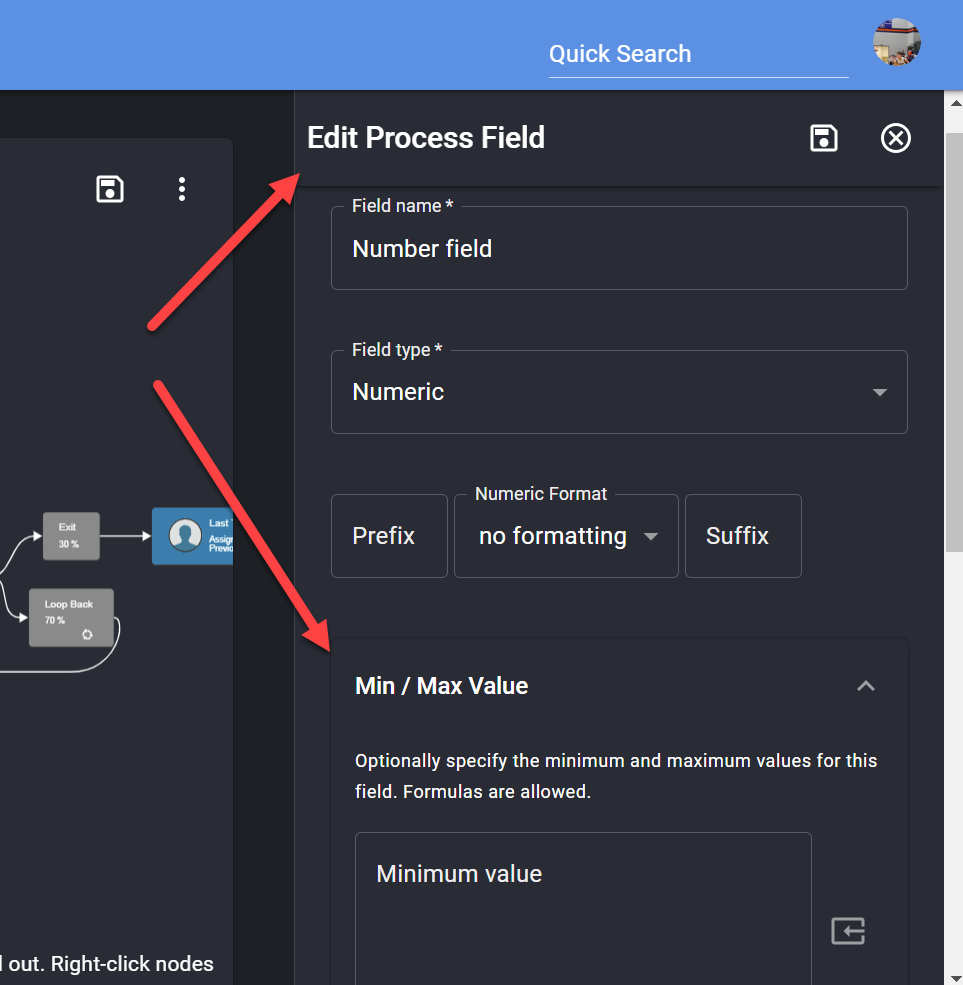
How the limits are enforced
Section titled “How the limits are enforced”The Min / Max Value option is available on Numeric, Percent, Date Picker and Date/Time Picker fields. Both limits are allowed values, so a minimum of 2026-10-01 accepts 2026-10-01 itself, and a date maximum of 0 allows today but not tomorrow.
-
On the form. A date field’s calendar only offers days inside the limits. A value outside them is outlined in red, and a date field shows the allowed range under it, such as Must be between 2026-10-01 and 2026-10-21. A task can’t be completed while a value you entered is outside its limits. On a start form or a public form, pressing the button shows the message below, and nothing is saved.
-
When the value is saved. ProcessPlan refuses a value outside the limits wherever it comes from: a task, the process fields panel, a public form or task link, a merge document sent for signing, the API, or the AI when it fills in a field for you in chat. None of the fields on that submission are saved, and the person sees a message such as Field Out Of Range: Fuel Date must be between 2026-10-01 and 2026-10-21.
-
What is not checked. Automated actions can still write any value, and so can an incoming webhook or email that starts a process, an AI Employee (including its process table steps), an AI Agent working on its own, and a field whose value is calculated by a formula. A value that was saved before its limits changed stays as it is until somebody changes it, and a copy of a process keeps the values it copies.