
=FORMAT
The =FORMAT function allows you to format numeric, date, or string values into a specific display format. Useful for controlling the appearance of calculated values in reports, forms, and workflow outputs.
Syntax (Numbers)
Section titled “Syntax (Numbers)”=FORMAT(FormatString; Number)Parameters (Numbers)
Section titled “Parameters (Numbers)”-
FormatString – The desired numeric format (e.g., 0.00 for two decimal places).
-
Number – The value you want to format.
Example (Numbers)
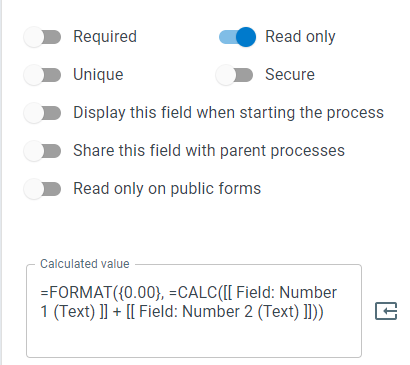
Section titled “Example (Numbers)”=FORMAT({0.00}; =CALC([[Field: Number 1 (Text)]] + [[Field: Number 2 (Text)]]))- If the sum of the numbers is 11, the result will display as 11.00.
Syntax (Dates)
Section titled “Syntax (Dates)”=FORMAT(FormatString; Date)Parameters (Dates)
Section titled “Parameters (Dates)”-
FormatString – The pattern to format the date (see specifiers below).
-
Date – The date field or value to format.
Example (Dates)
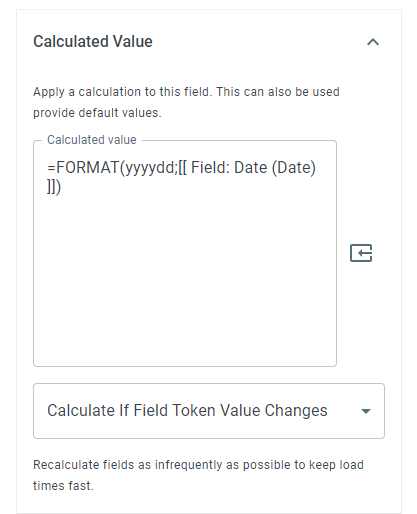
Section titled “Example (Dates)”=FORMAT(yyyyMM; [[Field: Date (Date)]])- For a date of 4 Nov 2023, the result will return 202311.
Common Date Format Specifiers
Section titled “Common Date Format Specifiers”“d” - The day of the month, from 1 to 31.
“dd” - The day of the month, from 01 to 31.
“ddd” - The abbreviated name of the day of the week.
“dddd” - The full name of the day of the week.
“h” - The hour, using a 12-hour clock from 1 to 12.
“hh” - The hour, using a 12-hour clock from 01 to 12.
“H” - The hour, using a 24-hour clock from 0 to 23.
“HH” - The hour, using a 24-hour clock from 00 to 23.
“m” - The minute, from 0 to 59.
“mm” - The minute, from 00 to 59.
“M” - The month, from 1 to 12.
“MM” - The month, from 01 to 12.
“MMM” - The abbreviated name of the month.
“MMMM” - The full name of the month.
“s” - The second, from 0 to 59.
“ss” - The second, from 00 to 59.
“t” - The first character of the AM/PM designator.
“tt” - The AM/PM designator.
“y” - The year, from 0 to 99.
“yy” - The year, from 00 to 99.
“yyy” - The year, with a minimum of three digits.
“yyyy” - The year as a four-digit number.
“yyyyy” - The year as a five-digit number.
”:” - The time separator.
”/” - The date separator.
Examples
Section titled “Examples”dd MMM yyyy hh:mm tt = 25 Dec 2016 12:00 pm
ddd d MMM = Fri 29 Aug
dddd dd MMMM = Friday 29 August
hh:mm:ss = 07:27:15
(M) MMM, MMMM = (8) Aug, August
Usage Notes
Section titled “Usage Notes”-
Works for numeric, date, and string formatting.
-
Semicolons (;) separate the format string and value.
-
Formula functions are case sensitive and must be in ALL CAPS.
Keywords
Section titled “Keywords”FORMAT, format number, format date, numeric formatting, date formatting, display format, string formatting, workflow formulas, calculated value formatting, process field formatting, formula function