
=CONTAINS
The CONTAINS function returns true if a specified search value is found within another text value. Otherwise, it returns false.
Syntax
Section titled “Syntax”=CONTAINS(DoesThisValueExist; AnywhereInsideThisValue)Parameters
Section titled “Parameters”-
DoesThisValueExist
- The value or text you want to search for.
-
AnywhereInsideThisValue
- The text or field token where the function will look for the search value.
How It Works
Section titled “How It Works”-
Checks whether the search value exists anywhere within the target text.
-
Returns 1 (true) if the search value is found.
-
Returns 0 (false) if the search value is not found.
Usage Notes
Section titled “Usage Notes”-
Use a semicolon (;) to separate the search value and the target text.
-
You can give more than one place to look, each after its own semicolon. The function returns 1 if any of them contains the search value.
-
Field tokens can be used to reference process fields.
-
The search ignores capitals, so Easy also finds EASY and easy.
-
A field token’s value is looked for as one value, even when it contains a semicolon. If text you type into the formula yourself contains a semicolon, wrap it in =ENCLOSE so it is looked for as one value too:
=CONTAINS(=ENCLOSE(Suite 4; Floor 2); [[Field: Address (Text)]])
Example
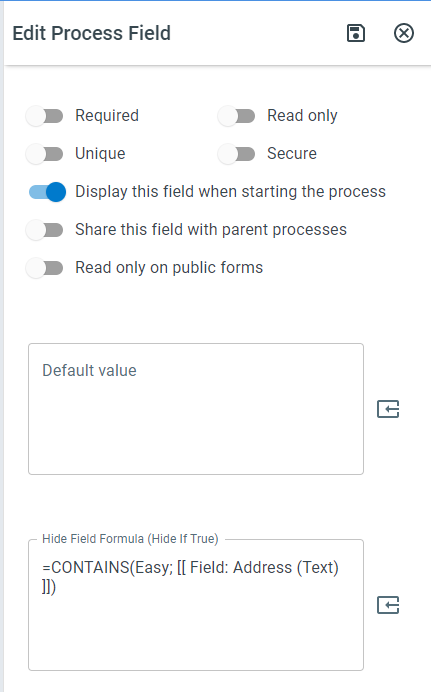
Section titled “Example”=CONTAINS(Easy; [[Field: Address (Text)]])- Returns 1 (true) if the word “Easy” exists anywhere in the Address field.
Keywords
Section titled “Keywords”CONTAINS, text search, find text, string contains, field validation, conditional logic, formula function, workflow formulas, process field check