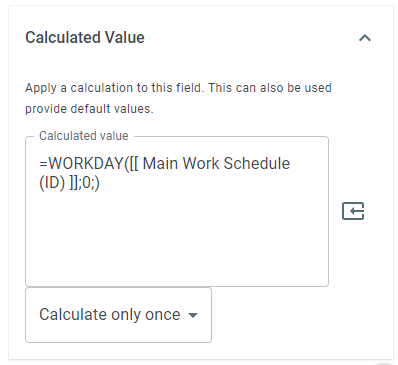
=WORKDAY
The WORKDAY function advances a given date to the next available working day as determined by a given work schedule.
Syntax
Section titled “Syntax”=WORKDAY(WorkScheduleID; WorkdaysToSkip; DateToStartEvaluatingFrom)-
WorkScheduleID - The field token for the work schedule you want to use in the calculation
-
WorkdaysToSkip - An optional field that accepts a number. If empty, the system will skip 0 workdays
-
DateToStartEvaluatingFrom - An optional field that accepts the field token for a date field. If empty, the system starts evaluating from today.
To use the WORKDAY Function, do the following:
-
In the parenthesis following =WORKDAY, enter the values you want to include in your calculation. Make sure you close the parenthesis
-
Use the Insert Field Token button to insert the Work Schedule ID field token and other information