
=LEFT
The =LEFT function extracts a specified number of characters from the beginning (left side) of a text value.
Syntax
Section titled “Syntax”=LEFT(count; value)Parameters
Section titled “Parameters”-
count
The number of characters to extract from the left side of the text. -
value
The text string (or field value) to extract characters from.
How It Works
Section titled “How It Works”-
Starts reading from the first (leftmost) character of the text value
-
Returns the number of characters specified by the count parameter
-
Stops once the requested number of characters is extracted
-
Does not modify the original value
Usage Notes
Section titled “Usage Notes”-
If the value is shorter than the count, the full value is returned
-
The function only works on text values; numbers may need to be converted to text first
-
Spaces and special characters are counted as characters
-
Formula functions are case sensitive and must be written in ALL CAPS
Example
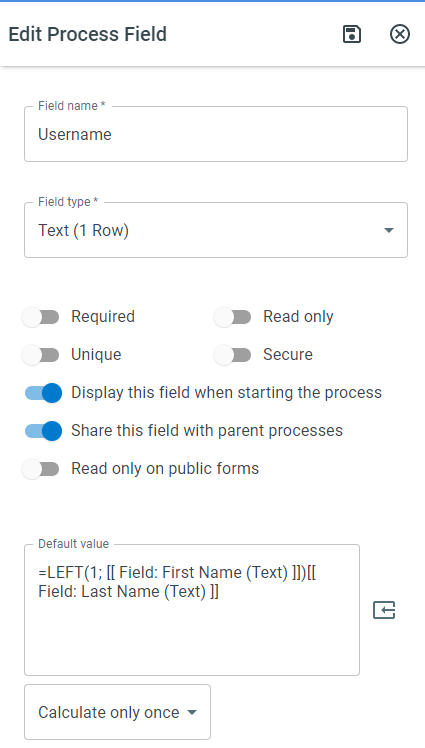
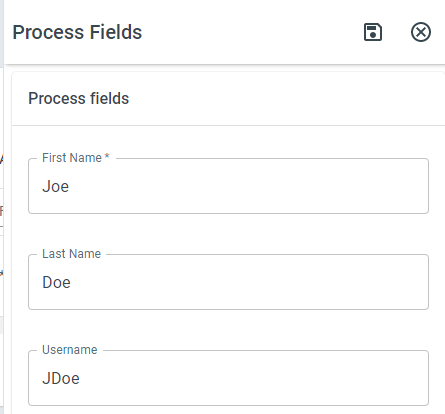
Section titled “Example”To extract the first three characters of a product code:
=LEFT(3; [Product Code])This returns the first three characters from the specified field.
Keywords
Section titled “Keywords”LEFT, text extraction, substring, string functions, formula function, text manipulation, calculated value