
=RIGHT
The RIGHT function extracts a specified number of characters from the end (right side) of a text value.
Syntax
Section titled “Syntax”=RIGHT(count; value)Parameters
Section titled “Parameters”count – The number of characters to extract from the right side of the text.
value – The text string or field value you want to extract characters from.
How It Works
Section titled “How It Works”-
Takes the input text string.
-
Counts characters from the rightmost end of the string.
-
Extracts the specified number of characters.
-
Returns the resulting substring.
Usage Notes
Section titled “Usage Notes”-
Formula functions are case sensitive and must be written in ALL CAPS.
-
Useful for extracting suffixes, codes, or trailing digits (e.g., ZIP codes, ID endings).
-
Commonly used in calculated fields within workflows.
-
Works with both hard-coded text and field tokens.
-
Does not modify the original value - only returns extracted characters.
Example
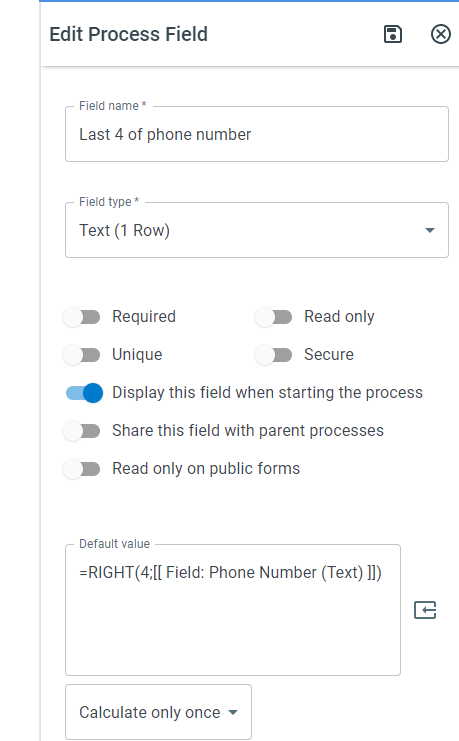
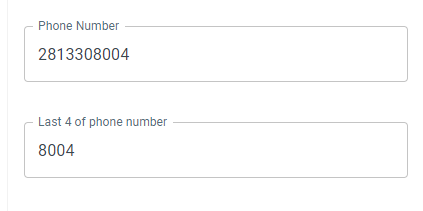
Section titled “Example”=RIGHT(4; [[Phone Number]])Returns
Section titled “Returns”The last 4 characters of the Phone Number field.
Keywords
Section titled “Keywords”RIGHT, extract characters, right substring, trailing text, last characters, text parsing, workflow formulas, formula function